
You own it, AI helps you run it.
POS for appliance stores. One-time source license. You host it.
Appliance Vision is the point-of-sale and inventory system we built for Gulf Coast Appliances — including a camera feature that reads the model and serial number straight off the tag, so intake and invoicing stop eating your afternoon. Sold once, owned outright, yours to keep building on. Private beta is closed. We are not taking additional stores at this time.
Actively running Gulf Coast Appliances's day-to-day operations — not a concept, a working system.
Everything Appliance Vision Does, In One Watch
Inventory intake, checkout, sign-off, deliveries (your own drivers and 3rd-party carriers alike), site issue documentation, P&L, employees, and backups — a quick tour of the whole system before you dive into the details below.
Start the Sale From the Sales Floor
No mockup — this is Appliance Vision running on an actual phone at Gulf Coast Appliances. Tap "Take Photo of Tag," photograph a real appliance tag, and watch it land in the sale with the model number, serial number, and description already filled in.
Set the price and it's ready to go — no squinting at a tag, no typing it in by hand, no doing the math yourself. Start it on the phone while you're standing with the customer, and it's waiting to be finished up at the register.
Photo Intake Is the Foundation Everything Else Runs On
Point a phone at the appliance's tag and Appliance Vision reads the model number, serial number, brand, and appliance type automatically — no typing, no transposed digits from a hand-copied serial number. Review what it found, correct anything a worn or glossy tag threw off, and it's in inventory in seconds.
Getting the data right at intake is doing more than it looks like. Every match the system makes later — pulling the right item into a sale, finding it in a search, grouping it correctly when the inventory list is sorted by type, matching it correctly on the P&L — once you set the price and complete the sale — depends on the model #, serial #, brand, and cost being right from the start. Get it wrong at intake and the mistake doesn't stay contained to that one screen; it resurfaces every time that unit gets touched again.
It also gets smarter the more it's used. Correct a brand or appliance type once for a given model number, and the system remembers — the next unit of that same model, scanned or typed, auto-fills the brand, type, and cost from the last one you received. One correction, and every unit after it is right automatically, with no extra work.
And it never blocks a sale to get there. Cost can be skipped entirely at intake and filled in later — it defaults to $0.00 rather than holding anything up, and the system flags every item still missing one so nothing quietly slips through, whether it's already sold or still on the floor.
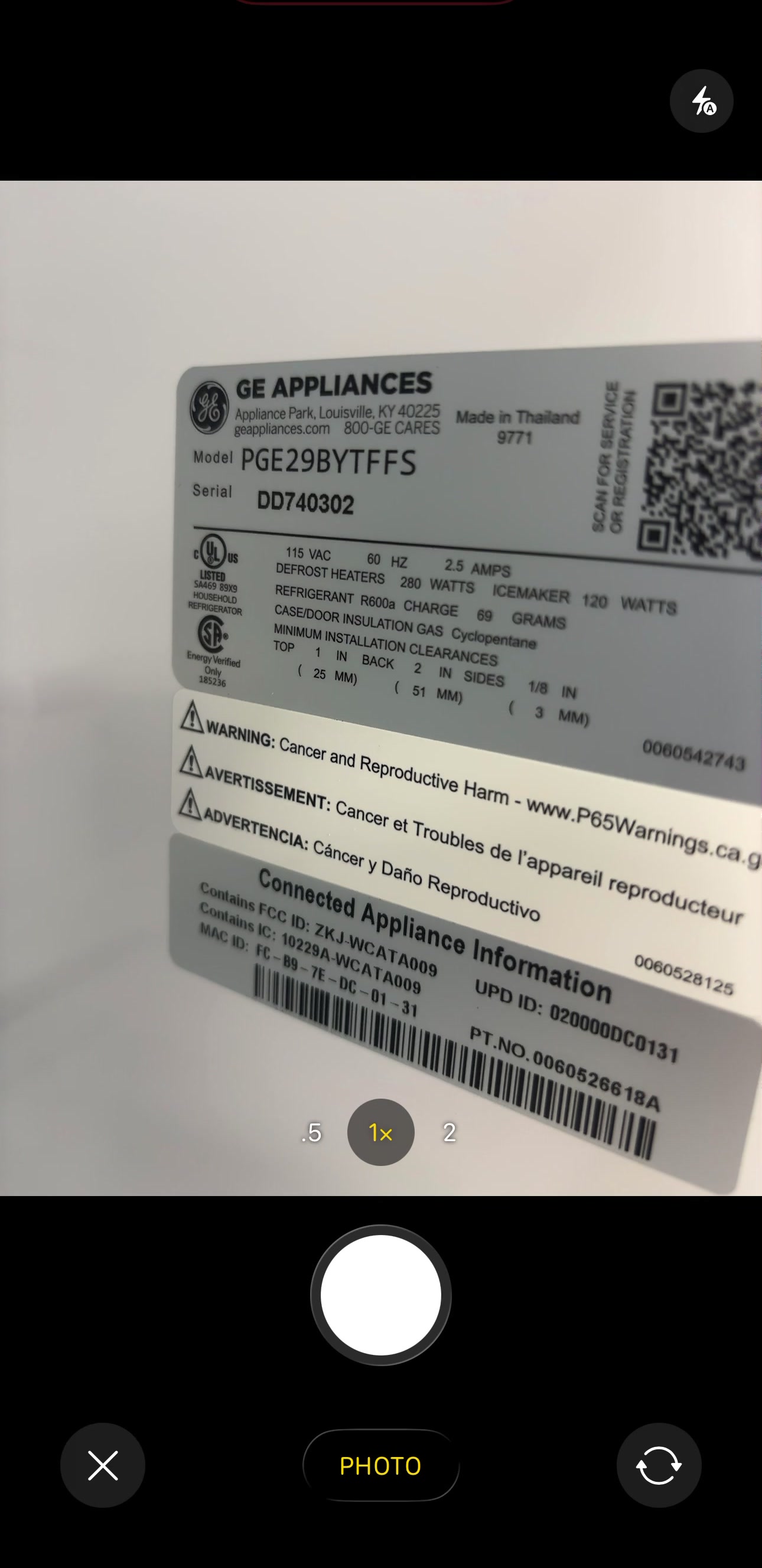
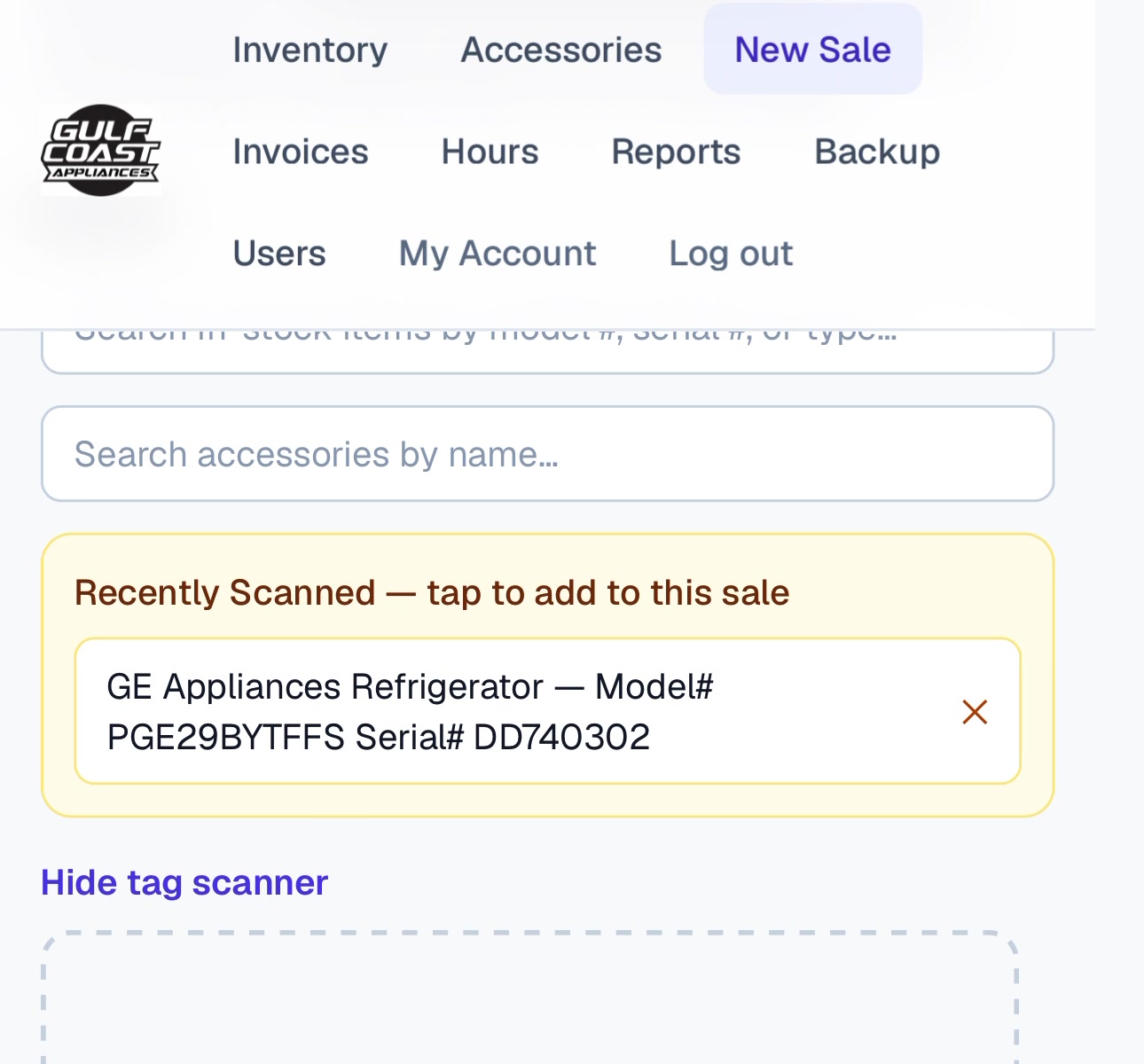
Read automatically and queued in Recently Scanned — tap it to add to the sale, or save straight to inventory.
One Sale, Every Step, No Paper
Ring up the sale, add a delivery fee and Appliance Vision asks what the fee was for — so it's never left blank. The customer initials each term and signs on a screen. When the truck shows up, the customer initials each term and signs on a screen again for the delivery. Every step lands on the invoice automatically. Complete the sale and the invoice emails itself. If they lose it later, send it again.
Sample data shown for illustration — no real customer information.
From Phone to Desktop, Every Screen
Inventory, checkout, invoicing, returns, review requests, P&L reporting, employee accounts, and backups — the same system, on a phone on the sales floor and on a desktop at the register.
Sample data shown for illustration — no real customer information.
Customers Initial and Sign on a Screen — Not a Clipboard
Pair an iPad at the counter and every sale term gets initialed digitally, one tap at a time — no printer, no clipboard, no signature to lose in a stack of paper. The customer reviews the sale (catching a wrong phone number or address right there, before it's final), initials each term, signs their name, and it's done.
Pairing a pad takes under a minute — scan a QR code or type a 6-digit code, no tech background required. Add a second one by the appliances and a busy Saturday never has to wait on the one iPad up front.
Selling over the phone or delivering later? Check one box and the customer gets a private link by email to that same screen on their own phone — no iPad required. The customer initials each term and signs on a screen. The link can't be reused afterward. Either way, every initial and the full signature are stamped onto the invoice automatically. Nothing to scan, nothing to file.
Paperless is the default here, not a rule — every signed invoice still has a Print / Save as PDF button, signature and all, for a customer who'd simply rather walk out with paper.
All sales are final. No refunds or exchanges, except for items found defective at installation.
If inside delivery is selected, neither the store nor the delivery company is liable for damage.
Extended warranty: Purchased
Signed by customer
One Calendar for Every Delivery — Reschedule with a Drag
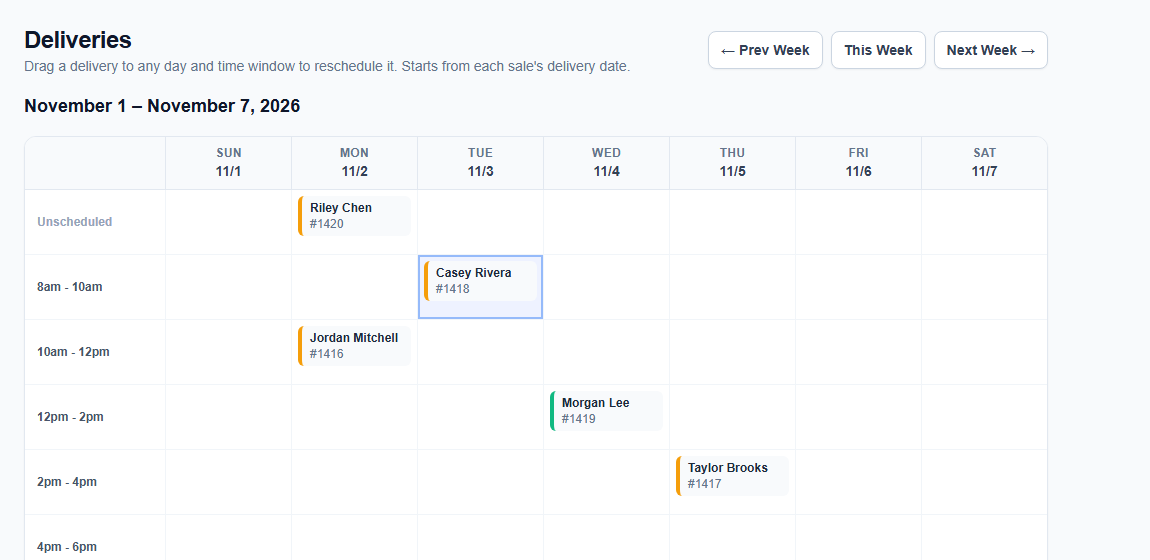
Every sale with a delivery date lands on one calendar automatically — no separate spreadsheet, no sticky notes on a paper planner. See the whole week at a glance, organized by day and the delivery window each sale is scheduled for.
Customer calls to push their delivery from Tuesday to Thursday? Drag the card to the new day and time — done, both the date and the window updated in one motion. Nothing to reopen, nothing to retype.
Every delivery ticket has its own Get Directions button — one tap and the customer's address opens straight in Google Maps, no retyping it into a separate app before pulling out of the lot.
And when the truck arrives, the driver hands over their own phone — the customer signs right there for the delivery, no clipboard, no paper ticket to lose on the way back to the store. Proof of delivery, done before they pull out of the driveway.
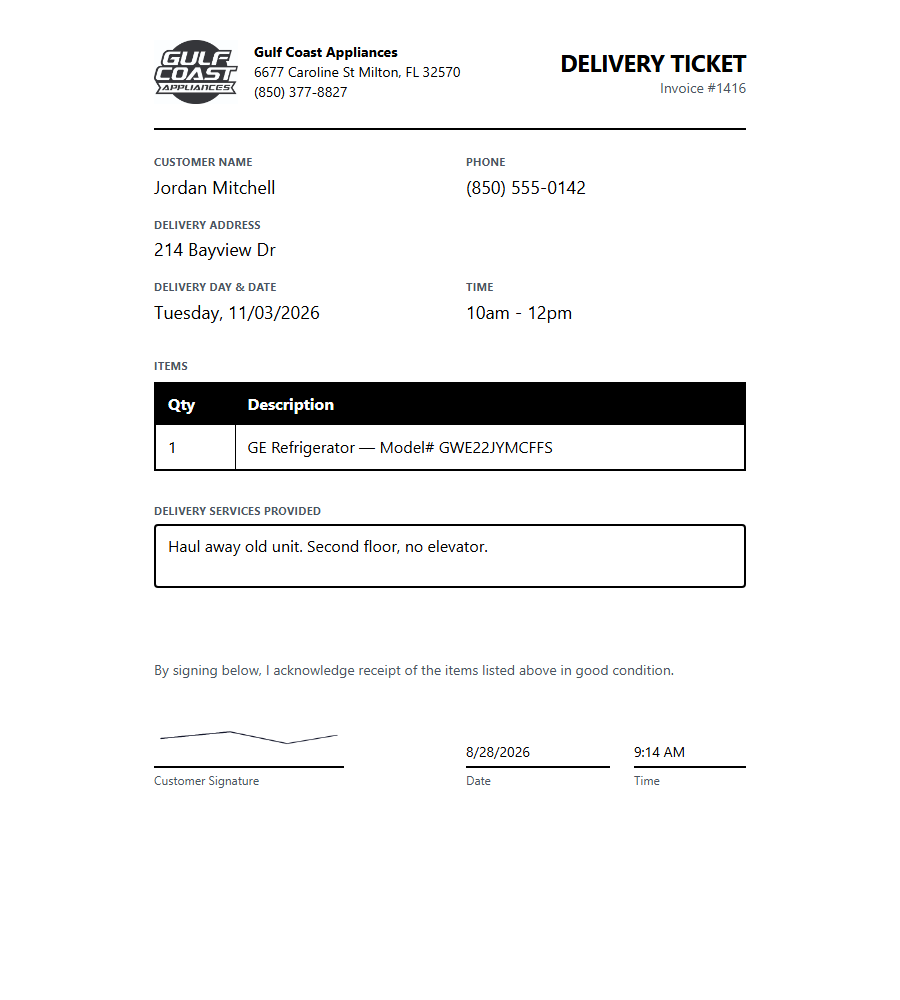
The delivery ticket — signature, date, and time filled in the moment the customer signs.
A Separate Calendar for In-Store Pickups
One toggle at checkout — Delivery or Pickup — and the sale lands on the calendar that actually matches how it's leaving the store. Pickups never mix in with the Deliveries calendar, so a driver's week and the counter's pickup list each stay exactly what they are.
It works exactly like the Deliveries calendar — week or month view, drag a card to a new day or time to reschedule it, drag past the edge to jump a week or month ahead.
Instead of a Delivery Ticket, a pickup gets a Pickup Ticket — the items the customer is taking, no prices. The customer initials each term and signs on a screen when they load up, confirming they received everything in good condition, and it marks itself picked up the moment they do.
Customer changes their mind after the fact — pickup instead of delivery, or the other way around? Flip the toggle on the sale and it moves itself to the other calendar automatically, ticket and all.
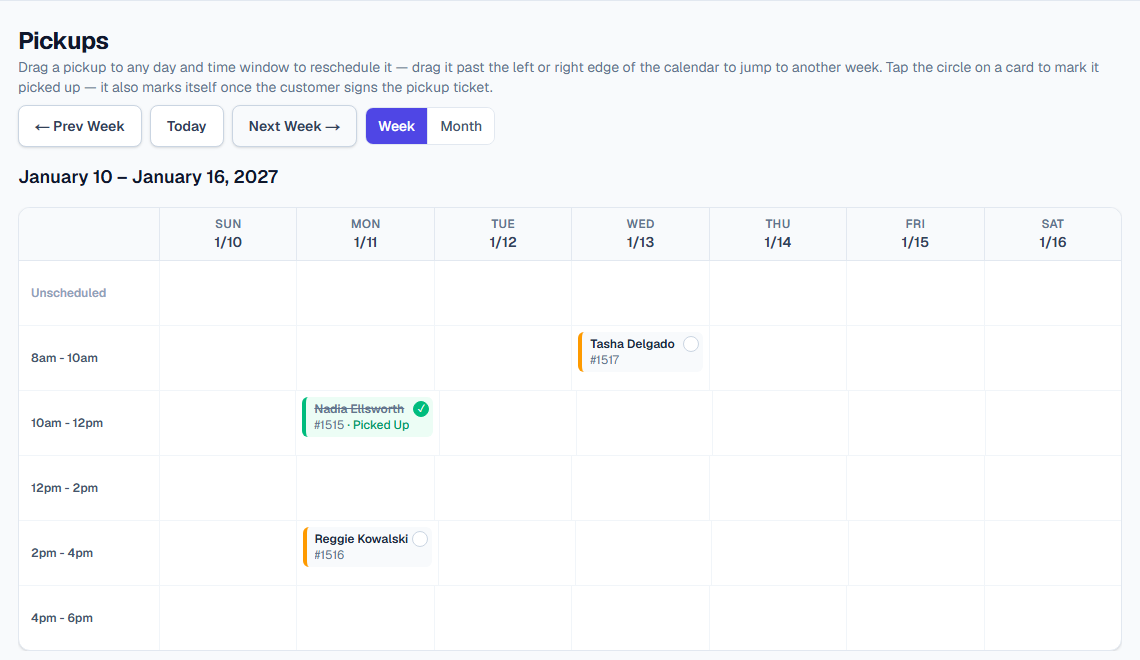
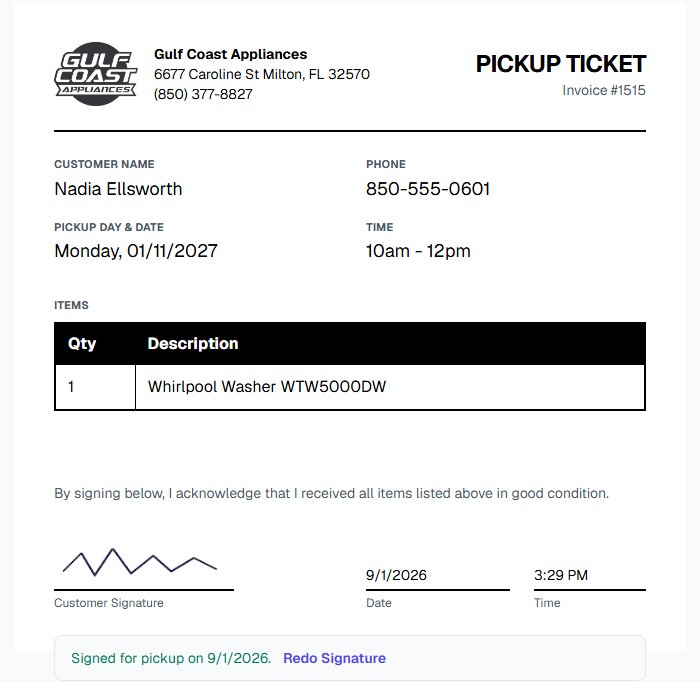
The Pickup Ticket — items only, no pricing, signed the moment the customer takes them.
Everything a Store Actually Needs — Nothing It Doesn't
Built by running a real appliance store on it every day, not designed in a vacuum.
Photo-Based Inventory Intake
Photograph an appliance tag and Appliance Vision reads the model number, serial number, brand, and appliance type automatically. Correct a model once and it remembers — the next unit of that same model fills itself in from the last one you received.
Condition & Inventory Tracking
Track every unit as new, new open box, or scratch & dent, with live counts by type and condition. Always know exactly what's on the floor and what it cost you. New, New Open Box, and Scratch & Dent are tracked natively side by side — built for stores that sell a blended floor, not just one or the other.
Checkout & Real Invoices
Snap tag photos right on the floor with any phone or iPad as customers pick items — no register needed, and multiple staff can be building different sales at once. Scanned items sync automatically, so the sale finishes seamlessly at the desktop with description already filled in. You set the price. Finish at the desktop — no retype. Complete the sale and the invoice emails itself. If they lose it later, send it again. Add warranty notes, delivery fees, and store credit, then print, save as PDF, or email a professional invoice. Filter the invoice list by status, date range, or payment method to find what you need fast.
Repeat-Customer Lookup
Search by name or phone at checkout and a returning customer's contact info fills in instantly, with their past purchases and a private staff note — "prefers text," a gate code, a tricky driveway — right there. No digging through old paperwork.
Catch Pricing Mistakes
Checkout flags a line priced at or below cost, or left with an unusually thin margin, the moment it's entered — a typo caught before it quietly eats into your profit, not after it shows up on the P&L.
Track Payments Over Time
Not every sale is paid in full up front. Log payments as they come in for layaway or "pay the rest on delivery," with a running history per invoice instead of just a final balance.
P&L & Sales Tax, Automatically
Every completed sale feeds real-time profit & loss and sales tax reports — gross profit, COGS, expenses broken down by category, and your most profitable models, without touching a spreadsheet. Mark a month's sales tax as filed once it's submitted to the state, and a return processed afterward tracks as an amendment instead of quietly changing numbers you've already filed. Built to help you spot problems early, not to replace your accountant or tax software.
Partial Refunds Without a Full Return
Give money back for a scratch, a shipping complaint, or a goodwill gesture without unwinding the whole sale. It lands right on the invoice as its own line, and your P&L and sales tax numbers adjust automatically — no side spreadsheet to remember to update.
Track What You Lose, Not Just What You Sell
Mark a damaged or unsellable unit as written off instead of leaving it sitting in inventory looking sellable. It comes off your floor count immediately and shows up as its own loss category on your P&L, so shrink is a real number, not a guess.
Paperless Customer Sign-Off
Customers initial each sale term and sign digitally on an in-store iPad, or from their own phone by email for a remote sale — no printing, no clipboard. The signature lands on the invoice automatically, printed or emailed. Pair as many iPads as your store needs in under a minute — scan a QR code or type a 6-digit code, no tech background required.
Deliveries Calendar
Every sale with a delivery date lands on one calendar automatically — week view or a full month at a glance. Drag a card to reschedule, even to a different week or month, no separate spreadsheet, no sticky notes.
Pickups Calendar
Customer picking up in-store instead of a delivery? A single toggle at checkout puts the sale on its own Pickups calendar — same week/month view and drag-to-reschedule as Deliveries, kept separate so the two never mix. The Pickup Ticket lists just the items, no prices, and the customer signs on the spot confirming they received everything in good condition.
Delivery Tickets, Signed on the Spot
A simple, driver-facing ticket for every delivery — items, address, and notes, no pricing. Get Directions, Call Customer, and Text Customer buttons put the driver one tap from getting there or reaching them, and the customer signs right on the driver's phone at drop-off, no clipboard or paper to lose.
Site Issue Documentation
Found a pre-existing problem that isn't the store's fault — a leak, exposed wiring, a tight access path? Log it with photos right on the delivery ticket before the customer signs, and the liability language updates automatically to match. The customer initials each term and signs on a screen.
Returns Done Right
Process a return on just the items that are actually coming back — inventory and P&L stay accurate even on a multi-item sale, instead of an all-or-nothing undo.
Automated Review Requests
Turn a completed sale into a Google review request with one click — texted from your business line or emailed, with a message that asks without being pushy.
Individual Employee Accounts
Give every employee their own login instead of a shared password. Control who can see financials and reports, and an activity log tracks who completed each sale, return, or deletion.
Employee Time Clock
Employees clock in and out right from the Hours page, with worked hours logged automatically to the nearest quarter hour — no separate time clock, no manual math at payroll time.
Automatic Backups
Nightly backups plus a one-click full export whenever you want a copy of everything — inventory, invoices, customers, and photos.
From Tag Photo to Tax Report
Snap a Photo
Point your phone at the appliance's tag. Model #, serial #, brand, and type are read automatically and added to inventory.
Sell It
Snap tag photos on the floor as customers choose — from any phone or iPad, with multiple staff working at once. Items sync automatically, so checkout finishes at the desktop with the description already filled in. You set the price. Finish at the desktop — no retype.
Ask for a Review
One click texts or emails the customer a short, honest review request — no separate app, no manual follow-up.
Watch Your Numbers
Gross profit, COGS, sales tax, and your best-selling models update themselves. No spreadsheet, no month-end scramble.
Why We Built It This Way
The world's catching up to something small business owners have known for a while: software that charges you every month rarely feels like it was built for your business — it's built for the average business, and you adjust your workflow to fit it instead of the other way around.
We built Appliance Vision to fix that in Gulf Coast Appliances first. Getting it there took real money and real time. When you buy a license, that's what you're actually getting: the finished result of that work, so you don't have to build it yourself from scratch — and you're not paying a company forever for the privilege of using software you'll never own.
A One-Time License, Not Another Subscription
To run Appliance Vision, you'll already need your own hosting and API subscriptions — for the AI service that reads tag photos, the database, and email delivery. Since you're already paying to run it, charging a second, recurring fee on top just to use the software didn't make sense to us. So it's a one-time license instead.
You get the source code
Not just a login. Appliance Vision is licensed as source code that runs on your own infrastructure — yours to keep, deploy, and maintain for as long as you use it.
Built to be customized
The same configuration-driven approach used to run Gulf Coast Appliances — inventory conditions, warranty terms, store details — lets you (or a developer you bring in) adjust it to exactly how your store operates, without waiting on a vendor roadmap.
Months of real development behind it
Appliance Vision isn't a weekend build. It's the product of months of active development, refined against real sales, real returns, and real customers at a real appliance store before ever being offered to anyone else.
Hosting costs are separate
The license fee covers the software itself. Running it takes your own low-cost, usage-based hosting and API subscriptions — the same kind any modern web app needs — billed to you directly by those providers, not by us.
Exact license pricing is being finalized during beta. We do not publish a license price. Private beta is closed — we are not taking additional stores at this time.
Keep Building On It
Since it's yours, it doesn't stop at what we shipped. Want to bolt on a repair-service tracker? A custom reporting view? Whatever your store actually needs? With an AI coding tool alongside you, that's a realistic weekend project, not a "hire a developer" project. That's the whole point of owning the source instead of leasing a feature list someone else controls.
A Community of People Doing the Same Thing
When you purchase Appliance Vision, you get access to our private user community — dealers running the same base code, comparing notes, and sharing what they've built on top of it. Someone builds a better way to handle special orders; someone else adds a repair-service module. You'll see it, and you can use it, adapt it, or leave it — every store's a little different, and that's the point.
It started with our original beta testers. Private beta is closed. We are not taking additional stores at this time.
One License Per Town
We intentionally limit sales geographically — once a dealer in your area has Appliance Vision, we won't license it to a competitor down the street. It's a better deal for you, and it's also what makes the community actually work: you're trading ideas with dealers who aren't bidding against you for the same customer, so people share openly instead of guarding what works.
Is This the Right Fit for Your Store?
We are not for everyone. We are for the store owner who wants to take what we built, tailor it, and make it better.
Appliance Vision isn't a shrink-wrapped service with a support line standing by — any third-party subscriptions needed to run pieces of it are yours to set up and manage. That's simply part of what owning the code outright means, instead of renting a login to something you'll never fully control.
The good news: getting real value out of owning your own code doesn't require being a professional developer anymore. Between the base source code and today's AI coding tools, a motivated store owner can realistically learn to make meaningful changes themselves — that's genuinely part of the plan, not a stretch goal.
That's the honest filter. If you want a vendor on the phone instead of owning the source and working with those tools, this is a poor fit — and there's no hard feelings either way. Private beta is closed. We are not taking additional stores at this time.
Frequently Asked Questions
What is Appliance Vision?
Point-of-sale software built specifically for appliance stores — photo-based inventory intake, checkout and invoicing, profit & loss reporting, and automated Google review requests. It's the actual system running Gulf Coast Appliances, a real store in Milton, FL, day to day.
Does this work if I sell scratch-and-dent alongside new units?
Yes — condition tracking (New, New Open Box, Scratch & Dent) is core to the product, not an add-on. It's built around how blended appliance stores actually stock and sell.
Do we have to go fully paperless, or can we still print things?
Paperless is the default, not a requirement. Invoices, delivery tickets, and pickup tickets are all built to be signed and sent digitally with nothing printed — but every one of them keeps a Print / Save as PDF button right on the page, signature included, for a customer or employee who'd rather have paper.
What does 'beta' mean here?
It means exactly what it says — this is early. It's a real, working system in daily use at a real store, but it's still being actively built on, and pricing isn't finalized yet. Private beta is closed. We are not taking additional stores at this time.
What does it cost?
Appliance Vision is a one-time license, not a subscription from us — final pricing per store is still being set while in beta. You'll separately need your own hosting and API subscriptions to run it (the same kind any modern web app needs), but there's no recurring fee to us on top of that. We do not publish a license price.
Not Taking Additional Stores
Private beta is closed. We are not accepting new store applications right now.
If you need to reach us, email sethatkinson@outlook.com.